

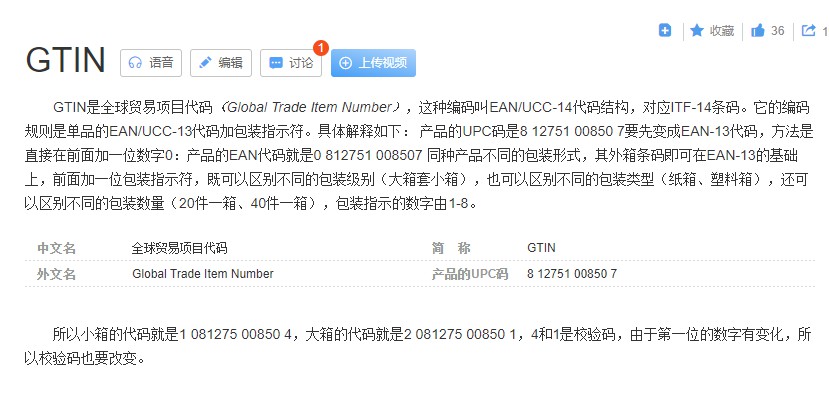
GTIN就是EAN-14,由EAN-13前边加1位包装指示数字得来。
GTIN条码和ITF-14条码的数字规则是一样的,但是图形结构不一样,ITF-14条码设计的间距更宽,面积更大,可识别度更高,打在纸箱或托盘上,即使有一定的脏污,还是能扫出来信息,ITF-14不能用于商品上。
通常只用于GTIN识别系统中产品的运输包装上(盒子、板条箱、托盘…)。ITF-14特别适用于物流中不良基材(如瓦楞纸板)的直接印刷。ITF-14不应用于POS扫描仪收银机。
起源于欧洲
起源于美国

https://www.tec-it.com/en/support/knowbase/barcode-overview/linear/Default.aspx#EAN13
GTIN


EAN


UPC

到GS1组织的中国代理网站,www.gs1cn.org, 中国物品编码中心,注册会员,获得企业前缀;
在中国物品编码中心网站上建立一个产品类别识别号;
在这个产品类别识别号下,生成单独型号的识别号。
费用说明

贸易公司,选进出口公司,2880元两年。
申请的时候,外贸公司选择国民经济行业分类,选择批发和零售业,批发业,第3列按你实际的产品类别选。
参考网址
https://www.tec-it.com/en/support/faq/barcode/bar-code-config/Default.aspx#110280
How Do I Create a Barcode for My Product?
To generate a valid bar code for retail use, you have to register it at your local GS1 organization. Please follow these steps:
Open the website https://www.gs1.org.
Register your company to get a company prefix for your barcode number.
After receiving a GS1 company prefix, you are able to assign a identification number for your product(s).
Now you are ready to generate the required EAN-13 / UPC-A barcode using one of our barcode software tools.
We recommend to test the generated barcode before using it on your product(s).
Your appropriate GS1 organization can provide you with specific information about getting GS1 company prefix or assigning numbers.Further information on this topic, you will find here:
https://www.gs1.org/standards/barcodes/10-steps-to-barcode-your-product/english
https://www.gs1.org/standards/get-barcodes
到GS1组织的中国代理网站,www.gs1cn.org, 中国物品编码中心,注册会员,获得企业前缀;
在中国物品编码中心网站上建立一个产品类别识别号;
在这个产品类别识别号下,生成单独型号的识别号;
生成自己的GTIN/EAN/UPC条码以后,上传到亚马逊店铺后台,亚马逊会给他们的ASIN亚马逊标准识别编码给你;
产品包装上要贴的就是这个ASIN条码。
如果是出口产品给客户,客户要在亚马逊上销售,就需要客户那边自己申请ASIN条码并提供给你,但客户可能需要你给他提供你的GTIN/EAN/UPC条码给他。
How to Generate Barcodes to Sell Products on Amazon?
Each product uploaded for sale on Amazon requires its own ASIN (Amazon Standard Identification Number) code which is obtained from Amazon and is generated based on your product's GS1 number: UPC, EAN or ISBN. If you already have ASIN codes for your product, you can generate barcodes with our barcode generation software.
If you still don't have ASIN codes to create product barcodes for Amazon, please follow these steps:
Contact your local GS1 organization to apply for valid UPC, EAN or ISBN numbers (https://www.gs1.org).
Having received GS1 numbers, forward them to Amazon to get ASINs for your products.
With a valid ASIN number, you are ready to generate the required Amazon product ID barcode (e.g. UPC, EAN, ISBN...) using one of our barcode software products.
We recommend to test the barcode before using it.
For detailed information on how to get ASIN numbers, please contact Amazon directly. Further information can be found here:
https://services.amazon.com/content/sellers-contact-amazon
https://www.amazon.com/gp/seller/asin-upc-isbn
https://www.wikihow.com/get-an-amazon-standard-identification-number-(asin)
你可以用下边这个网站,生成一个假的。
注意这个条码只能扫出一串数字,没有任何商品信息和企业信息,因为是你自己编的,和GS1的数据库没有任何关系。
贴标之前务必和客户确认这个编码是扫不出任何产品信息和企业信息,只能扫出一串数字,你们也没有gs1账号。
务必确保客户不会用于在线平台销售,只是自己的ERP系统内部使用。否则你就得只能去gs1cn.org去注册付费会员申请条码了。
自己编一个前缀和后缀
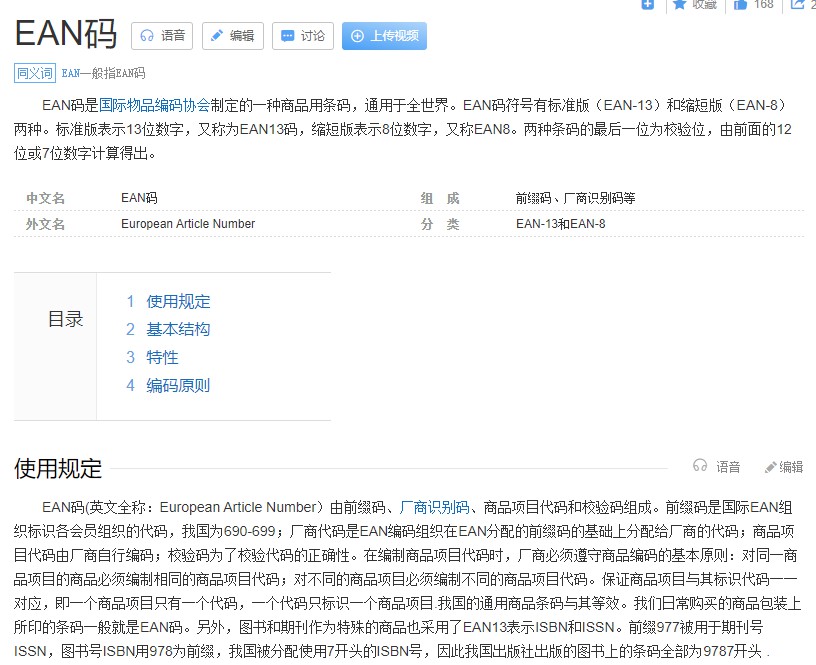
中国的国家代码是690-699
695+4位企业代码+4位产品代码+1位校验码
例子:我自己编的,Prefix前缀是69525432
Suffix后缀(即校验码)需要从0~9十个数字里依顺序尝试,跟你前边编的前缀有关,如果后缀错误,右边会显示不出条码图形,提示校验码错误。
https://barcode.tec-it.com/en/EAN13


Start Value起始值,设置1
End Value结束值,设置2
Increment增量,设置1
会生成两个条码,download的gif图片只会是第一个编号的

下载之后,删除第一个编号,第二个编号还是要重新更改后缀才能成功生成条码。

有几个产品,就要生成几个条码。


 添加表情
添加表情

分享至微信


